Get Started for Account Administrators
This guide is designed to help Account Admins understand what to monitor, manage, and how to optimize the Alteryx One environment—including user licensing, usage tracking, workspace setup, and security.
Workspaces
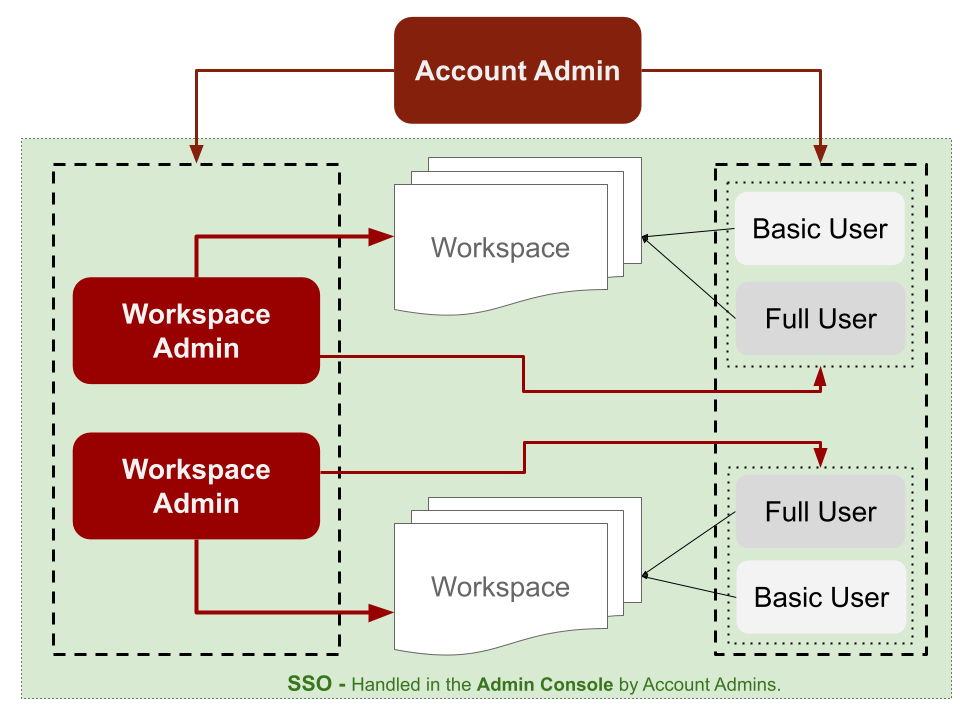
Workspaces are team-specific environments (for example Sales, Marketing, HR). Each workspace has a Workspace Admin who manages users, roles, and connections within that workspace.
For more on Admin Roles, go to User Roles.
Managing Users and Permissions
Account Admins can invite other admins.
Workspace Admins can only manage users within their assigned workspace.
User Roles
Full User Role: Includes access to advanced features, Designer Cloud, etc.
Basic User Role: Limited feature access, ideal for lightweight users or viewers.
Note
You can assign account-level roles, such as Account Admin, when inviting users from the admin panel. Workspace-specific roles are managed by Workspace Admins.
Key Metrics to Track
User Overview
Total number of onboarded users
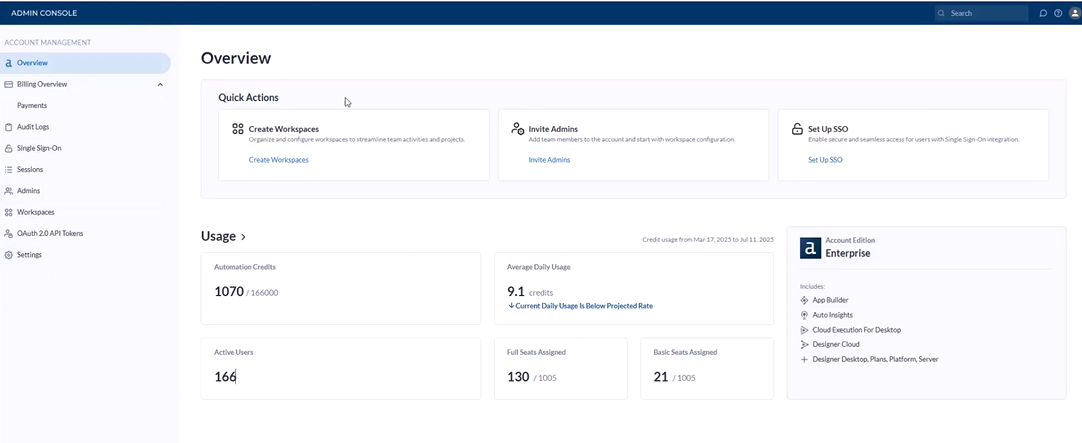
Breakdown by user role (Full vs Basic)
Admin and workspace assignments
Run Usage
Total runs used vs runs remaining
Run consumption by workspace or department
Historical usage trends for forecasting
Workspace Utilization
Number of active/inactive workspaces
Workspace-based usage patterns
Workspace-specific run consumption
Security & IT Controls
SSO Setup
Handled in the Admin Console by Account Admins to ensure secure, enterprise-grade access.
Audit Logs
Access logs of:
Who logged in and when
What actions were taken (debugging, setup changes, etc.)
Great for IT, compliance, or platform governance reviews.
Department-Level Controls
While direct run limits by department are not yet a native feature, you can:
Track usage per workspace: Treat each workspace as a “department”
Manually monitor usage metrics to flag overages
Use internal policies for run quotas
Pro Tips
Start small: Create dedicated workspaces for high-usage departments.
Review usage weekly: Use the Admin Console to proactively manage roles and optimize usage.
Limit Full Role: Workspace Admins can assign the Viewer role to collaborators or stakeholders who only need read-only access within a workspace.
Export audit logs monthly to keep a clean compliance record.
Future updates may introduce more granular quota/limit settings per department or user group. Stay tuned!