Getting Started for Account-Level Administrators
This guide is designed to help you, the Account Admin, understand what to monitor, manage, and how to optimize your Alteryx One environment — including user licensing, usage tracking, workspace setup, and security.
Workspaces
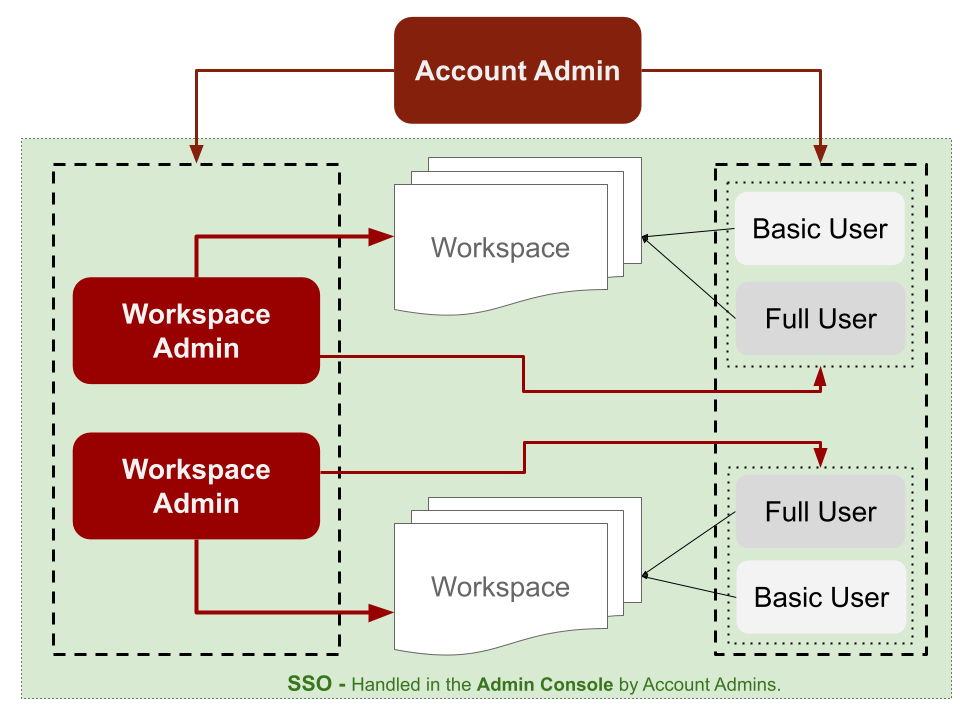
Workspaces are team-specific environments (e.g. Sales, Marketing, HR). Each workspace has a Workspace Admin who manages users, roles, and connections within that workspace.
For Admin Roles take a look on User Roles.
Managing Users and Licenses
Add Users
Account Admins can add users at the global level.
Workspace Admins can only manage users within their assigned workspace.
License Types
Full User Role: Includes access to advanced features, Designer Cloud, etc.
Basic User Role: Limited feature access, ideal for lightweight users or viewers.
Note
You can assign roles when inviting users or anytime later from the admin panel.
Key Metrics to Track
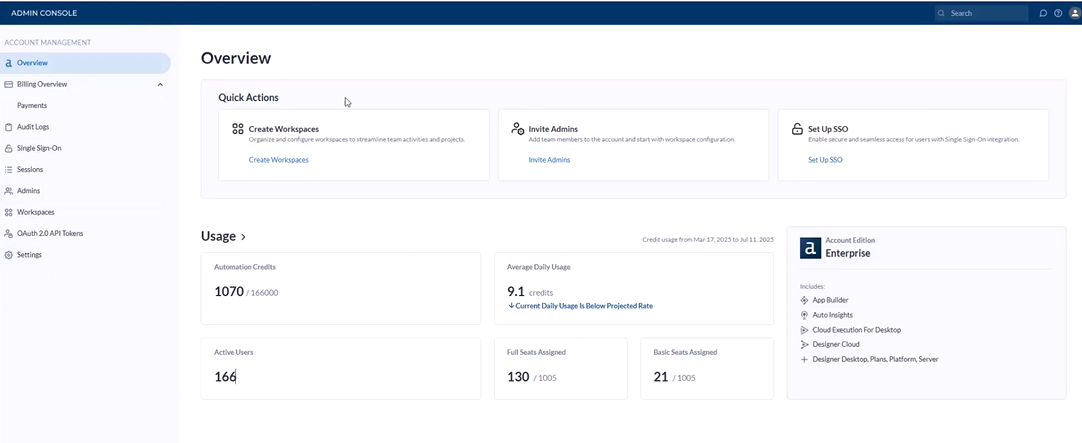
User Overview
Total number of onboarded users
Breakdown by license type (Full vs Basic)
User roles and workspace assignments
Run Usage
Total runs used vs runs remaining
Run consumption by workspace or department
Historical usage trends for forecasting
Workspace Utilization
Number of active/inactive workspaces
Department-based usage patterns
Workspace-specific run consumption
Security & IT Controls
SSO Setup
Handled in the Admin Console by Account Admins to ensure secure, enterprise-grade access.
Audit Logs
Access logs of:
Who logged in and when
What actions were taken (debugging, setup changes, etc.)
Great for IT, compliance, or platform governance reviews.
Department-Level Controls
While direct run limits by department are not yet a native feature, you can:
Isolate usage per workspace: Treat each workspace as a “department”
Manually monitor usage metrics to flag overages
Use internal policies for run quotas
Pro Tips
Start small: Create dedicated workspaces for high-usage departments.
Review usage weekly: Use the Admin Console to proactively manage licenses and optimize usage.
Limit Full licenses to power users; assign Basic licenses to collaborators or stakeholders.
Export audit logs monthly to keep a clean compliance record.
Future updates may introduce more granular quota/limit settings per department or user group. Stay tuned!