Create Insights
プリセットレポートの作成
プリセットレポートは手動で作成することも、テンプレートを使用して作成することもできます。
プリセットレポートを作成するには、Auto Insightsホームページから[新規作成]を選択し、[プリセットレポート]を選択します。
次のテンプレートオプションから1つ選択します: 主な指標の概要、KPI詳細分析レポート、相関分析レポート、または空白のキャンバスを作成。
KPI詳細分析: データセットを確認または選択し、測定値を選択します。次に、[プリセットレポートの作成]を選択します。Auto Insightsが新しいプリセットレポートに日時付きで名前を作成します。これは、[プリセットレポートサマリー]ページで変更できます。
主な指標の概要: データセットを確認または選択し、[プリセットレポートの作成]を選択します。Auto Insightsが新しいプリセットレポートに日時付きで名前を作成します。これは、[プリセットレポートサマリー]ページで変更できます。
相関分析: データセットを確認または選択し、2つの測定値を選択します。次に、[プリセットレポートの作成]を選択します。Auto Insightsが新しいプリセットレポートに日時付きで名前を作成します。これは、[プリセットレポートサマリー]ページで変更できます。
注記
データセットに時系列データが含まれていない場合、相関分析は動作しません。
ゼロから構築するには、[空白のキャンバスを作成]を選択します。使用可能な列から適切な計算タイプ(合計、平均、またはカウント)を選択し、1つ以上の測定値を設定してプリセットレポートを作成するか、[平均の基準]ドロップダウンを使用して[複合平均]を選択します。次に、[プリセットレポートの作成]を選択します。
[プリセットレポートの作成]を選択すると、[プリセットレポートサマリー]ページが表示され、すべてのインサイトが表示されます。プリセットレポートの編集に関する詳細については、 Edit Preset Reportsページを参照してください。時系列データが含まれていないデータセットを使用する場合、変更分析は使用できません。
Query Bar
Each page has a query bar that provides the focus of analysis for that specific page. Use this query bar to get Auto Insights to search for insights on a specific area. Note: Time period selection is unavailable if you use a dataset without time series data.
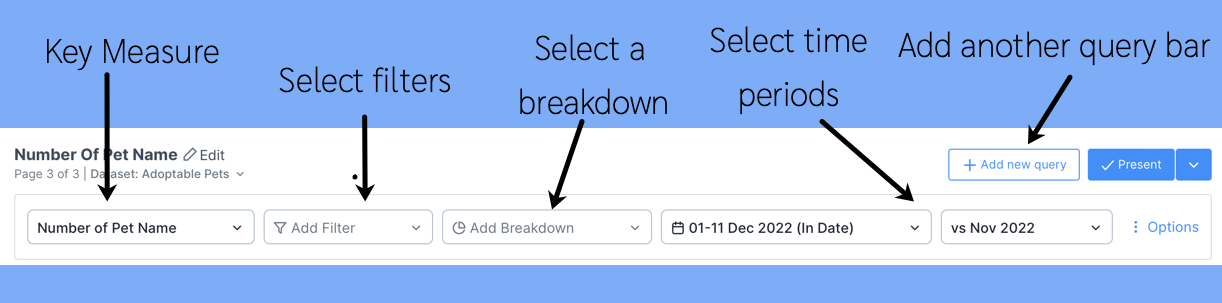
Some questions to ask while interacting with the query bar:
Do I want Auto Insights to tell me where to focus?
I'm not sure which segment I should break down by. Things always change each month.
If this is what you need each month, let Auto Insights do the work and identify the largest contributing factors that cause the change.
You should leave the filters and breakdowns blank in this scenario. This way, Auto Insights will calculate the largest contributing factors and display them in descending order.

OR
I know that I need to focus on a specific area...
I need to only look at my team's performance. I'm not interested in other teams.
I need to focus only on my product. I'm not interested in other products.
In this scenario, you should add filters to your query—for example, Team 6.
OR
I know that I want to compare across a segment (dimension)
I need to understand movement across all teams.
I need to know how my product is performing against other products.
In this scenario, you should add breakdowns to your query, for example, Teams.
